
Introduction
Artificial Intelligence is evolving at an incredible pace, and one term that has quickly become the center of attention is AI Agents. From software development and customer support to healthcare, finance, and automation, AI Agents are transforming the way applications interact with users and perform complex tasks. Unlike traditional chatbots that simply generate text responses, AI Agents can reason, remember information, make decisions, use external tools, and perform actions to solve real-world problems.
If you've been following recent AI trends, you've probably heard about frameworks like LangChain, CrewAI, AutoGen, OpenAI Agents SDK, and Model Context Protocol (MCP). While these frameworks are powerful, many tutorials introduce them right away without first explaining the core concepts that make an AI Agent work. As a result, many developers learn how to use a framework but don't fully understand what happens behind the scenes.
This article takes a different approach.
Instead of starting with a framework, we'll begin by understanding the fundamental architecture of an AI Agent. We'll build the concepts step by step—from connecting Python to a Large Language Model (LLM), adding prompt engineering and conversation memory, integrating Python tools, and finally enabling the AI to automatically decide which tool to use based on the user's request. Once these building blocks are clear, frameworks like LangChain and MCP become much easier to understand because you'll know exactly what they are automating.
Whether you're a Software Engineer, Data Engineer, AI Engineer, Technical Lead, Architect, Engineering Manager, or an AI enthusiast, this guide will help you understand how modern AI Agents are built from the ground up. By the end of this article, you'll have a solid understanding of the architecture behind Agentic AI and why it is becoming one of the most valuable skills in today's AI-driven software development landscape.
Let's begin by understanding what an AI Agent really is and how it differs from a traditional AI chatbot.
What is an AI Agent?
An AI Agent is an intelligent software system that not only understands human language but also thinks, remembers, makes decisions, uses external tools, and performs actions to accomplish a specific goal. Unlike a traditional chatbot that simply generates text responses, an AI Agent can interact with its environment, retrieve information, execute functions, and automate tasks on behalf of the user.
Think of an AI Agent as a digital assistant with a brain and hands. The Large Language Model (LLM) acts as the brain, enabling the agent to understand natural language, reason about problems, and determine the best course of action. However, just like the human brain cannot physically interact with the world without hands, an LLM alone cannot perform real-world tasks such as reading files, calculating values, sending emails, or retrieving the current time. This is where memory and tools come into play.
The following simplified architecture illustrates how a modern AI Agent works:
User
│
▼
Large Language Model (Brain)
│
▼
Memory
│
▼
Tools
│
▼
Action
Let's understand each component in detail.
1. User
Every interaction begins with a user request. The user communicates with the AI Agent in natural language without worrying about which program, API, or tool needs to be used.
For example:
- "What time is it now?"
- "Calculate 125 × 845."
- "Create a file called notes.txt."
- "Summarize this document."
The user simply describes the desired outcome.
2. Large Language Model (The Brain)
The Large Language Model (LLM) is the intelligence behind the AI Agent. It understands the user's request, interprets the context, reasons about the problem, and decides what should happen next.
For straightforward questions such as:
"What is Machine Learning?"
the LLM can answer directly from its knowledge.
However, for requests like:
"What time is it right now?"
the LLM recognizes that it does not have access to live information. Instead of guessing, it decides that a tool is required to obtain the correct answer.
This ability to reason and decide is what makes AI Agents significantly more powerful than traditional chatbots.
3. Memory
Memory enables the AI Agent to remember previous interactions within a conversation or across multiple sessions.
Without memory, every user request would be treated as a completely new conversation.
For example:
User:
My name is Prabakaran.
Later...
User:
What is my name?
Without memory, the AI cannot answer correctly.
With memory, it can respond:
Your name is Prabakaran.
Memory makes conversations more natural, personalized, and context-aware.
4. Tools
Tools allow the AI Agent to interact with the outside world.
Some common tools include:
- Current date and time
- Calculator
- File reader
- File writer
- Database access
- Web search
- Email services
- APIs
- External business applications
When the LLM determines that a task requires external information or an action, it invokes the appropriate tool instead of attempting to generate an answer from its internal knowledge.
5. Action
The final step is performing the requested action.
For example, if the user asks:
"Create a file called notes.txt with the text 'Welcome to Agentic AI.'"
The sequence is:
- The LLM understands the request.
- It decides that the Create File tool is needed.
- The tool creates the file.
- The result is returned to the LLM.
- The AI Agent informs the user:
"The file notes.txt has been created successfully."
The user experiences a seamless conversation, while the AI Agent handles the reasoning, tool selection, execution, and response generation behind the scenes.
Bringing It All Together
The complete workflow of an AI Agent can be summarized as follows:
User
│
▼
Large Language Model (Brain)
│
├── Answer directly (if no external action is required)
│
└── Use Memory
│
▼
Decide whether a Tool is needed
│
▼
Execute the Tool
│
▼
Generate the Final Response
This combination of reasoning, memory, tool usage, and action execution is what distinguishes an AI Agent from a traditional AI chatbot. In the next section, we'll build these capabilities step by step using Python, allowing you to understand the complete architecture before introducing frameworks like LangChain or Model Context Protocol (MCP).
Building Blocks of an AI Agent
Before building a complete AI Agent, it is important to understand the four fundamental building blocks that work together to make the agent intelligent and capable of performing real-world tasks. These building blocks are Large Language Models (LLMs), Prompt Engineering, Memory, and Tool Calling. Each component has a unique responsibility, and together they form the foundation of every modern Agentic AI application.
Large Language Model (LLM) – The Brain of the AI Agent
The Large Language Model (LLM) is the intelligence behind an AI Agent. It is responsible for understanding natural language, interpreting user intent, reasoning about problems, and generating meaningful responses.
An LLM has been trained on massive amounts of text data, allowing it to answer questions, explain concepts, generate code, summarize documents, translate languages, and perform many other language-related tasks.
Think of the LLM as the brain of the AI Agent. Just as the human brain analyzes information before making decisions, the LLM processes user input and determines the best way to respond.
However, an important limitation exists. The LLM only knows what it learned during training. It cannot access live information or perform real-world actions on its own.
For example, if you ask:
"What is Machine Learning?"
The LLM can answer directly because it already possesses the required knowledge.
But if you ask:
"What time is it right now?"
The LLM cannot reliably answer because it does not know the current time. Instead, it must rely on an external tool to retrieve that information.
This is why an LLM alone is not an AI Agent. It is only one essential component of the overall system.
Prompt Engineering – Teaching the AI How to Think
A Large Language Model is only as effective as the instructions it receives. Prompt Engineering is the process of designing clear and structured instructions that guide the AI's behavior.
A prompt is much more than a simple question. It defines the AI's role, responsibilities, communication style, and decision-making process.
For example, instead of asking the LLM:
"Answer the user's question."
we can provide detailed instructions such as:
- You are an AI Assistant.
- Be concise and professional.
- Use tools whenever external information is required.
- Never guess unknown information.
- Explain your reasoning clearly.
These instructions significantly improve the quality and consistency of the AI's responses.
In an AI Agent, prompt engineering plays an even more important role. Rather than asking the model to directly answer every question, we instruct it to decide whether a tool is required.
For example:
User:
What time is it now?
Instead of answering, the LLM returns:
TOOL:time
This structured response allows the Python application to execute the appropriate tool before generating the final answer.
Prompt Engineering transforms a general-purpose language model into a specialized AI Agent capable of planning and decision-making.
Memory – Giving the AI Context
Imagine introducing yourself to someone, only to have them forget your name every few seconds. Conversations would quickly become frustrating.
Without memory, AI behaves in exactly the same way. Every user request is treated as a completely new conversation.
Memory enables the AI Agent to retain important information from previous interactions and use that context when responding.
For example:
User:
My name is Prabakaran.
Later in the conversation:
User:
What is my name?
Without memory, the AI cannot answer correctly.
With memory, it responds:
Your name is Prabakaran.
Memory also enables the AI Agent to:
- Continue long conversations naturally.
- Remember previous questions and answers.
- Maintain conversational context.
- Personalize responses.
- Build more human-like interactions.
Modern AI applications often combine short-term conversation memory with long-term knowledge storage to create highly personalized experiences.
Tool Calling – Giving the AI the Ability to Act
While the LLM provides intelligence, Tool Calling gives the AI Agent the ability to interact with the real world.
Whenever the AI encounters a task that requires external information or an action, it invokes the appropriate tool instead of attempting to generate the answer itself.
Common AI Agent tools include:
- Current Date and Time
- Calculator
- File Reader
- File Writer
- Database Queries
- Web Search
- Email Services
- Weather APIs
- Business Applications
- Enterprise Systems
Consider the following user request:
Create a file named notes.txt containing "Welcome to Agentic AI."
The AI Agent performs the following steps:
- Understands the user's request.
- Determines that a file creation tool is required.
- Calls the file creation tool.
- Creates the file.
- Receives confirmation from the tool.
- Responds naturally to the user:
The file notes.txt has been created successfully.
This ability to invoke external tools transforms an AI Assistant into an AI Agent capable of performing meaningful real-world tasks.
Bringing the Building Blocks Together
Each building block has a distinct responsibility, but their true power emerges when they work together.
User
│
▼
Large Language Model
(Reasoning & Planning)
│
▼
Prompt Engineering
(Guides AI Behavior)
│
▼
Memory
(Maintains Context)
│
▼
Tool Calling
(Interacts with the Real World)
│
▼
Action
An effective AI Agent is not just an LLM. It is the combination of intelligent reasoning, carefully designed prompts, conversation memory, and the ability to use external tools that enables it to solve real-world problems efficiently.
In the following sections, we'll build each of these components step by step using Python, allowing you to understand the complete architecture before exploring advanced frameworks such as LangChain and the Model Context Protocol (MCP).
Our Workshop Journey: Building an AI Agent Step by Step
Learning Agentic AI can feel overwhelming because there are so many frameworks, libraries, and concepts available today. Many tutorials begin with tools like LangChain or other AI frameworks, leaving learners wondering how everything actually works behind the scenes.
Our workshop follows a different philosophy.
Instead of relying on frameworks from the very beginning, we build an AI Agent step by step, understanding each building block before combining them into a complete system. By the end of the journey, you'll not only know how to use AI frameworks—you'll understand why they work.
Our learning path is structured as follows:
Lab 1
Connect Python to LLM
│
▼
Lab 2
AI Chat Application
│
▼
Lab 3
Prompt Engineering
│
▼
Lab 4
Conversation Memory
│
▼
Lab 5
Manual Tool Calling
│
▼
Lab 6
Automatic Tool Calling (AI Agent)
Let's briefly understand what we build in each lab.
Lab 1 – Connect Python to an LLM
Every AI Agent begins with a Large Language Model (LLM). In the first lab, we establish a connection between a Python application and an LLM using an API.
By the end of this lab, you will understand:
- How to connect Python to an LLM
- How to send prompts
- How to receive AI-generated responses
- How to structure a simple AI application
This forms the foundation for everything that follows.
Lab 2 – Build an AI Chat Application
Once the connection is established, the next step is to create a simple conversational application.
In this lab, we build an interactive AI chatbot that allows users to ask questions and receive responses in real time.
You will learn:
- Interactive user input
- Sending dynamic prompts
- Receiving AI responses
- Building a basic command-line chat application
At this stage, the AI behaves like a standard chatbot without memory or external capabilities.
Lab 3 – Prompt Engineering
The quality of an AI Agent depends heavily on the instructions it receives.
In this lab, we introduce Prompt Engineering, teaching the AI how to behave using carefully designed system prompts.
You will learn how to:
- Define AI roles and responsibilities
- Control response style and behavior
- Build reusable prompt templates
- Guide the AI toward structured outputs
This transforms a general-purpose language model into a specialized assistant.
Lab 4 – Conversation Memory
Real conversations require context.
Without memory, the AI forgets every previous interaction. In this lab, we add conversation memory so the AI can remember earlier messages and provide more meaningful responses.
You will learn:
- How conversation history works
- Short-term memory implementation
- Context-aware conversations
- Maintaining state across multiple interactions
This makes the AI feel much more natural and intelligent.
Lab 5 – Manual Tool Calling
An LLM can generate text, but it cannot perform real-world actions by itself.
In this lab, we introduce Tool Calling. Instead of asking the AI to perform an action directly, the user manually selects a tool, and Python executes it.
Examples include:
- Getting the current date and time
- Performing calculations
- Creating files
- Reading files
- Listing directory contents
This demonstrates how Python can extend the capabilities of an LLM.
Lab 6 – Automatic Tool Calling (Building a Real AI Agent)
This is the most exciting milestone in the workshop.
Instead of the user choosing a tool, the AI decides which tool is required based on the user's request.
For example:
User:
What time is it now?
The AI reasons:
TOOL:time
Python executes the tool, retrieves the current time, and the AI presents the result in natural language.
Similarly:
User:
Calculate 125 × 845.
The AI decides:
TOOL:calculate:125*845
This is the point where the application evolves from a simple chatbot into a true AI Agent capable of reasoning, planning, and taking action.
The Big Picture
Each lab builds on the previous one, gradually adding a new capability until we have a fully functional AI Agent.
Python
│
▼
LLM
│
▼
Chat Application
│
▼
Prompt Engineering
│
▼
Memory
│
▼
Tool Calling
│
▼
Automatic Tool Selection
│
▼
AI Agent
By following this structured learning path, you'll gain a deep understanding of how modern AI Agents are designed and implemented. More importantly, when you later work with frameworks such as LangChain, OpenAI Agents SDK, or Model Context Protocol (MCP), you'll recognize that these frameworks are simply automating the same concepts you've already built yourself from scratch.
Manual Tool Calling
One of the biggest limitations of a Large Language Model (LLM) is that it cannot directly interact with the outside world. While it can generate text, explain concepts, and answer questions based on its training, it cannot perform real-world actions such as retrieving the current time, reading a file, or executing a mathematical calculation by itself.
This is where Tool Calling becomes essential.
In Manual Tool Calling, the user explicitly tells the application which tool should be executed. The AI does not make the decision; instead, the user selects the appropriate tool, and the Python application executes it.
The workflow is simple:
User
│
▼
Tool
│
▼
Current Time
For example, suppose our application provides a Time Tool.
Instead of asking a natural language question, the user directly enters the tool name:
User Input:
time
The application recognizes that the user wants to use the Time Tool and immediately executes the corresponding Python function.
The execution flow looks like this:
User
│
▼
time
│
▼
Tool Executor
│
▼
Python Function
│
▼
Current Date & Time
The output may look like:
Current Date & Time:
05-Jul-2026 10:45:32 AM
Similarly, if the user wants to perform a mathematical calculation, they explicitly invoke the calculator tool.
User Input:
calculate 125*845
The application executes the calculator function and returns:
105625
The same approach can be used for other tools such as:
- Creating a text file
- Reading the contents of a file
- Listing files in a directory
- Performing database operations
- Calling external APIs
In every case, the user is responsible for deciding which tool to invoke.
Although this may seem simple, Manual Tool Calling introduces one of the most important concepts in Agentic AI—the separation between reasoning and execution. The LLM is responsible for understanding language, while Python tools are responsible for interacting with the external world.
However, there is one major drawback to this approach.
The user must already know which tool to use. Instead of asking:
"What time is it now?"
the user must type:
time
Likewise, instead of naturally asking:
"Calculate 125 × 845."
the user has to manually invoke the calculator tool.
This makes the interaction less intuitive and places additional responsibility on the user.
The natural next step is to allow the AI itself to decide which tool should be used. Instead of relying on the user to select a tool, the LLM analyzes the request, determines the appropriate action, invokes the correct tool, and finally presents the result in a conversational manner.
This evolution—from Manual Tool Calling to Automatic Tool Calling—marks the transition from a simple AI-powered application to a true AI Agent, which is exactly what we'll explore in the next section.
Automatic Tool Calling – The Magic Behind AI Agents
So far, we have seen how Manual Tool Calling works. While it enables an application to perform real-world tasks, it still depends on the user knowing which tool to invoke. This approach works, but it doesn't feel natural.
What if the user could simply ask a question in plain English, and the AI Agent could understand the request, decide which tool to use, execute the tool, and respond naturally?
This is exactly what Automatic Tool Calling achieves.
It is one of the most important capabilities of a modern AI Agent and represents the point where a chatbot evolves into an intelligent assistant capable of reasoning and taking action.
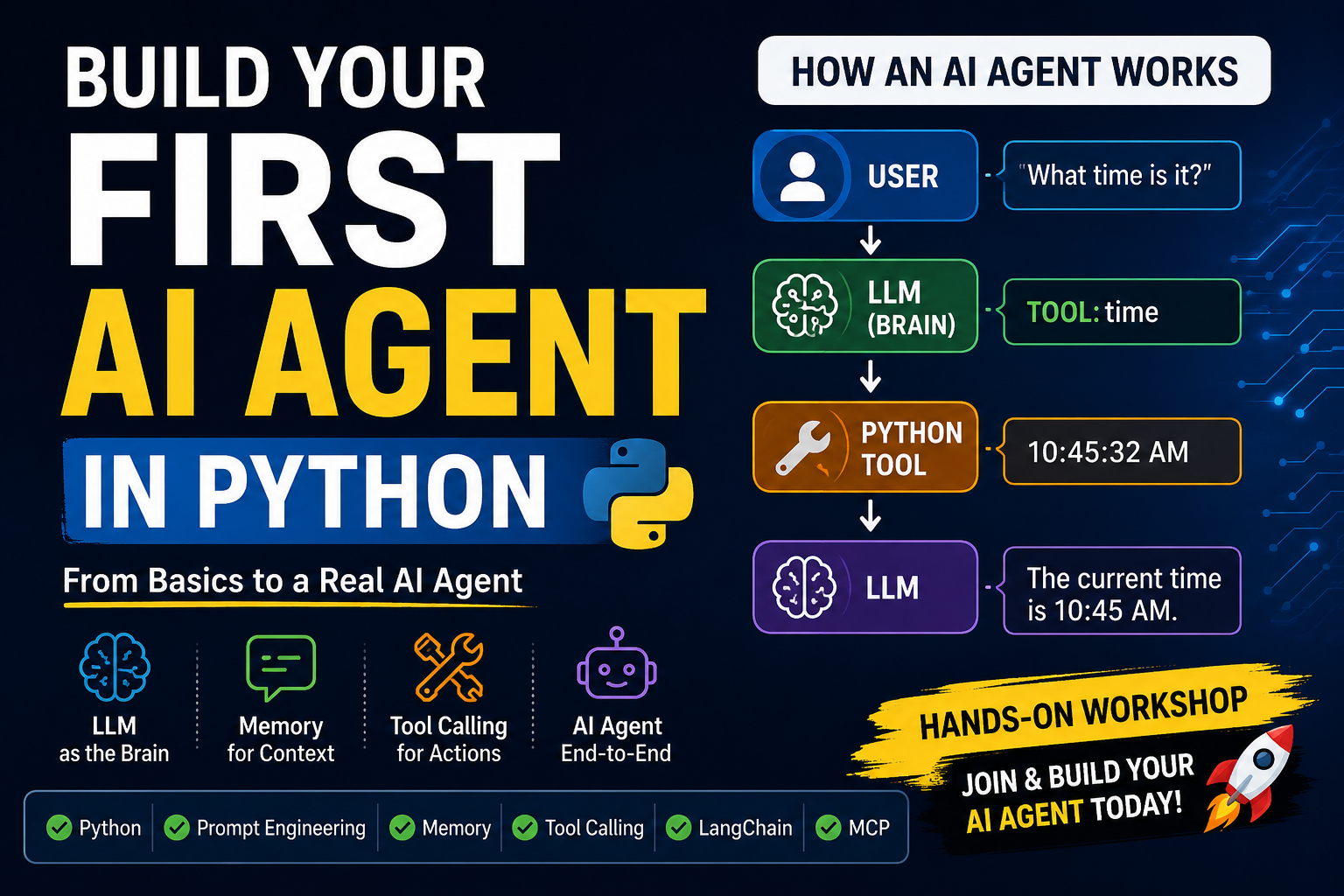
The complete workflow is illustrated below:
User
│
▼
"What time is it?"
│
▼
Large Language Model (LLM)
(Reasoning & Planning)
│
▼
TOOL:time
│
▼
Python Time Tool
│
▼
Current Time Retrieved
│
▼
Large Language Model (LLM)
│
▼
"The current time is 10:45 AM."
Let's understand what happens behind the scenes.
Step 1 – The User Asks a Natural Question
Instead of entering a command such as:
time
the user simply asks:
What time is it?
This is how humans naturally communicate, and the AI Agent is designed to understand these requests.
Step 2 – The LLM Understands the Intent
The Large Language Model analyzes the user's question.
It immediately realizes:
- The user needs the current time.
- The current time is live information.
- I cannot answer this accurately using my training data.
- I need help from an external tool.
Instead of trying to guess the answer, the LLM decides to invoke the Time Tool.
Step 3 – The LLM Chooses the Correct Tool
Because we have instructed the LLM through Prompt Engineering, it doesn't generate a normal sentence.
Instead, it produces a structured command:
TOOL:time
This is not magic.
It is simply the LLM following the instructions provided in its system prompt.
The structured output tells the Python application exactly which tool should be executed.
Step 4 – Python Executes the Tool
The Python application receives:
TOOL:time
It recognizes that the Time Tool has been requested and executes the corresponding Python function.
For example:
get_current_time()
The tool retrieves the current system time.
Example output:
05-Jul-2026 10:45:32 AM
At this stage, Python has completed the requested action.
Step 5 – The Tool Result is Sent Back to the LLM
The raw output from the tool is useful for a computer, but not always ideal for a human conversation.
Instead of showing:
05-Jul-2026 10:45:32 AM
the application sends this information back to the LLM.
The LLM now has everything it needs:
- The user's original question.
- The result produced by the tool.
Step 6 – The AI Generates a Natural Response
- Finally, the LLM transforms the raw tool output into a conversational response.
- Instead of displaying technical data, it responds naturally:
- The current time is 10:45 AM.
- This makes the interaction feel like a conversation with an intelligent assistant rather than a command-line program.
Why This Feels Like Magic
To the user, everything happens seamlessly.
They simply ask:
"What time is it?"
Behind the scenes, however, the AI Agent performs multiple intelligent steps:
- Understands the user's request.
- Determines that external information is required.
- Chooses the correct tool.
- Executes the tool.
- Receives the tool's output.
- Converts the result into a natural, human-friendly response.
All of these operations happen in just a few seconds, giving the impression that the AI "knows" the answer.
The Secret Behind Modern AI Agents
This workflow is the foundation of almost every modern Agentic AI framework, including:
- LangChain
- OpenAI Agents SDK
- CrewAI
- AutoGen
- Model Context Protocol (MCP)
Although these frameworks provide powerful abstractions, they all follow the same core pattern:
User Request
│
▼
Reasoning (LLM)
│
▼
Tool Selection
│
▼
Tool Execution
│
▼
Tool Result
│
▼
Natural Language Response
The only difference is that these frameworks automate much of the orchestration. The underlying architecture remains the same.
Why We Built It Ourselves First
One of the key objectives of our workshop is to help you understand how AI Agents work internally before introducing frameworks.
By manually building:
- LLM integration
- Prompt Engineering
- Memory
- Tool Calling
- Automatic Tool Selection
you gain a deep understanding of the complete Agentic AI workflow.
Once these concepts are clear, learning frameworks such as LangChain or implementing Model Context Protocol (MCP) becomes significantly easier because you'll recognize that they are simply automating the architecture you've already built from scratch.
This practical, first-principles approach not only makes you a better AI developer but also enables you to design, debug, and extend AI Agents with confidence in real-world applications.
Why This Approach is Better Than Starting with LangChain
One of the most common mistakes beginners make when learning Agentic AI is jumping directly into popular frameworks such as LangChain, CrewAI, or the OpenAI Agents SDK. While these frameworks are powerful and significantly reduce development effort, they also hide many of the underlying concepts that every AI engineer should understand.
Imagine learning to drive a car without first understanding what the steering wheel, brakes, and accelerator do. You might be able to operate the vehicle, but when something unexpected happens, troubleshooting becomes difficult because you don't understand how the system works.
The same principle applies to AI Agents.
Many tutorials start with a few lines of LangChain code, and within minutes, an AI Agent appears to be working. Although this is exciting, it often leaves learners with questions such as:
- How did the AI decide which tool to use?
- Where is the conversation memory stored?
- How does the framework communicate with the LLM?
- What happens when a tool fails?
- How can I customize the agent's behavior?
Without understanding the architecture, these questions become difficult to answer.
Our workshop follows a different approach.
Instead of relying on a framework from the beginning, we first build every major component ourselves using Python.
Connect Python to LLM
│
▼
Build a Chat Application
│
▼
Design Effective Prompts
│
▼
Add Conversation Memory
│
▼
Implement Tool Calling
│
▼
Build an AI Agent
│
▼
Learn LangChain
This progression ensures that every concept is understood before introducing automation.
The learning philosophy can be summarized as:
Understanding
│
▼
Implementation
│
▼
Framework
Rather than:
Framework
│
▼
Copy Code
│
▼
Hope It Works
When you build an AI Agent from scratch, you gain a much deeper understanding of its internal architecture. You learn how prompts influence decision-making, how memory maintains conversation context, how tools are selected and executed, and how the LLM converts tool results into natural language responses.
Once these fundamentals are clear, learning LangChain becomes much easier. Instead of treating it as a mysterious framework, you recognize it as a collection of reusable components that automate the tasks you've already implemented yourself.
For example:
| What We Built Manually | What LangChain Provides |
|---|---|
| LLM Connection | Chat Models |
| Prompt Templates | Prompt Templates |
| Conversation Memory | Memory Components |
| Tool Executor | Tool Abstractions |
| Agent Logic | Agent Executors |
| AI Decision Loop | Built-in Agent Framework |
At this point, LangChain is no longer something to memorize—it becomes a productivity tool that helps you write less code while applying concepts you already understand.
This approach also prepares you for working with other modern frameworks such as CrewAI, OpenAI Agents SDK, Microsoft AutoGen, and Model Context Protocol (MCP). Although their APIs differ, they all rely on the same core principles: reasoning, memory, tool calling, and orchestration.
The Long-Term Benefit
Developers who understand the fundamentals can:
- Design custom AI Agents for unique business requirements.
- Debug complex agent behavior when things go wrong.
- Integrate new tools and APIs with confidence.
- Evaluate and adopt new AI frameworks more quickly.
- Build scalable and maintainable Agentic AI applications.
In contrast, developers who only know how to use a framework often struggle when they need functionality that isn't covered by a tutorial.
The goal of this workshop is not simply to teach you how to use LangChain. It is to help you understand how AI Agents actually work. Once you master the fundamentals, frameworks become accelerators rather than crutches, enabling you to build more robust, flexible, and production-ready AI solutions.
What You'll Learn in Our Agentic AI Workshop
The field of Agentic AI is evolving rapidly, and organizations are increasingly looking for engineers who can build intelligent systems capable of reasoning, remembering, and performing real-world tasks. This workshop has been carefully designed to provide a practical, hands-on learning experience that focuses on building AI Agents from the ground up rather than simply using existing frameworks.
By the end of this workshop, you will have developed a solid understanding of both the fundamental concepts and the practical implementation of modern AI Agents.
Fundamentals of AI Agents
Begin by understanding what an AI Agent really is and how it differs from a traditional AI chatbot. Learn the architecture of an AI Agent, its key components, and how reasoning, memory, and tool execution work together to solve real-world problems.
Building AI Agents Using Python
Learn how to build an AI Agent from scratch using Python. Starting with a simple connection to a Large Language Model (LLM), you'll gradually add features such as conversation handling, prompt engineering, memory, and tool execution to create a fully functional AI Agent.
LangChain Framework
Once you understand the fundamentals, you'll explore the LangChain framework and see how it simplifies many of the components you have already built manually. Rather than treating LangChain as a black box, you'll understand the concepts behind it and use it more effectively.
LLM as the Brain of an AI Agent
Discover how Large Language Models act as the reasoning engine behind an AI Agent. Learn how an LLM interprets user requests, makes decisions, determines when external tools are required, and generates intelligent, context-aware responses.
Conversation Memory
Build AI Agents that remember previous conversations and maintain context across multiple interactions. Learn how conversation memory improves user experience and enables more natural, personalized, and intelligent conversations.
Prompt Engineering
Master the art of writing effective prompts that control the behavior of an AI Agent. Learn how system prompts, user prompts, and structured instructions influence reasoning, decision-making, and response quality.
Tool Calling
Extend your AI Agent beyond text generation by integrating Python functions and external tools. Learn how AI Agents can perform calculations, retrieve the current time, create and read files, interact with APIs, and execute real-world actions.
Model Context Protocol (MCP)
Understand the Model Context Protocol (MCP) and why it is becoming an important standard for connecting AI Agents with external tools, databases, enterprise applications, and other AI services. Learn how MCP enables secure, scalable, and standardized communication between AI models and external systems.
Building an End-to-End AI Agent
Bring everything together by developing a complete AI Agent that combines:
- Large Language Models (LLMs)
- Prompt Engineering
- Conversation Memory
- Automatic Tool Selection
- Tool Execution
- Natural Language Responses
By the end of the workshop, you'll have built an end-to-end AI Agent capable of understanding user requests, making intelligent decisions, interacting with external tools, and responding naturally—using the same architectural principles employed by modern Agentic AI frameworks.
Who Should Attend?
This workshop is ideal for:
- Software Engineers
- Data Engineers
- AI Engineers
- Technical Leads
- Architects
- Engineering Managers
- Students and AI Enthusiasts
- Anyone interested in building practical AI applications
Whether you're just starting your Agentic AI journey or looking to strengthen your understanding of modern AI architectures, this workshop provides the knowledge and hands-on experience needed to build real-world AI Agents with confidence.
Learn by Building, Not Just Watching
Unlike theory-only sessions, this workshop emphasizes hands-on implementation. Every concept is demonstrated through live coding, and you'll build each component yourself—from connecting Python to an LLM to creating a complete AI Agent capable of reasoning, remembering, using tools, and performing actions.
By the end of the workshop, you won't just know what an AI Agent is—you'll know how to build one from scratch and understand the architectural principles behind today's leading Agentic AI frameworks.
Conclusion
End with something like:
AI Agents are becoming one of the most important skills for software engineers. Understanding how they work internally—not just using frameworks—will help you build more reliable, maintainable, and scalable AI applications.
Ready to Build Your First AI Agent?
The future of software development is no longer just about writing code—it's about building intelligent systems that can reason, remember, make decisions, and perform real-world tasks. AI Agents are rapidly becoming an essential technology across industries, and developers who understand how to build them will have a significant advantage in the years ahead.
If you're serious about learning Agentic AI through hands-on implementation rather than just theory, I invite you to join our practical Agentic AI Workshop. Together, we'll build an AI Agent from scratch using Python and gradually enhance it with Prompt Engineering, Conversation Memory, Tool Calling, LangChain, and Model Context Protocol (MCP).
By the end of the workshop, you'll not only understand how modern AI Agents work internally but also have the confidence to build your own intelligent applications for real-world use cases.
What You'll Build
- ✅ Connect Python to a Large Language Model (LLM)
- ✅ Build an interactive AI Chat Application
- ✅ Design effective prompts using Prompt Engineering
- ✅ Implement Conversation Memory
- ✅ Enable Tool Calling and Automatic Tool Selection
- ✅ Explore the LangChain Framework
- ✅ Understand and implement Model Context Protocol (MCP)
- ✅ Build a complete end-to-end AI Agent
Whether you're a Software Engineer, Data Engineer, AI Engineer, Technical Lead, Architect, Engineering Manager, or an AI enthusiast, this workshop is designed to help you gain practical skills that you can apply immediately in your projects.
Continue Your Agentic AI Journey
🌐 Explore Teltam: https://teltam.in
📚 Read More AI Blogs:https://teltam.in/#blogs
📝 Register for the Agentic AI Workshop:
https://docs.google.com/spreadsheets/d/1yjmuYBGA-cVI45mDlQKy9wlSA2bVqjatNtDpb9qsmUY/edit?gid=0#gid=0
Let's Build the Future of AI—One Agent at a Time
The best way to learn Agentic AI is not by watching endless videos or copying code from tutorials—it's by building AI Agents yourself.
I look forward to helping you take your first step into the exciting world of Agentic AI. See you in the workshop!