LangChain Explained: Complete Guide for Beginners (2026)
Introduction
If you are building AI applications today, you have probably heard about LangChain.
But what exactly is LangChain, and why is it widely used in modern AI development?
Large Language Models can generate text, answer questions, summarize information, and help solve problems. However, real-world AI applications often need more than a simple prompt and response.
An AI application may need to:
-
Access external data
-
Search documents
-
Remember conversations
-
Use APIs and tools
-
Perform multiple steps
-
Generate structured outputs
This is where LangChain helps.
In this guide, we will understand LangChain step by step and explore how its components can be used to build real-world AI applications.
What Is LangChain?
LangChain is a framework designed to help developers build applications powered by Large Language Models (LLMs).
Instead of simply sending a prompt to an AI model and receiving a response, LangChain provides components for connecting LLMs with:
-
Prompts
-
Data sources
-
Tools
-
Memory
-
Retrieval systems
-
Multi-step workflows
In simple terms:
LangChain helps connect AI models with data, tools, and application logic.
This makes it possible to build applications such as:
-
AI chatbots
-
Document-based question-answering systems
-
RAG applications
-
AI agents
-
Multi-step AI workflows
Why Do We Need LangChain?
A basic LLM interaction may look like this:
User Prompt
     ↓
LLM
     ↓
Response
This is useful for simple tasks.
However, real-world applications may require additional capabilities.
For example:
User Question
     ↓
Retrieve Relevant Information
     ↓
Send Context to LLM
     ↓
Use Tools if Required
     ↓
Generate Response
LangChain provides building blocks that help developers create these types of workflows.
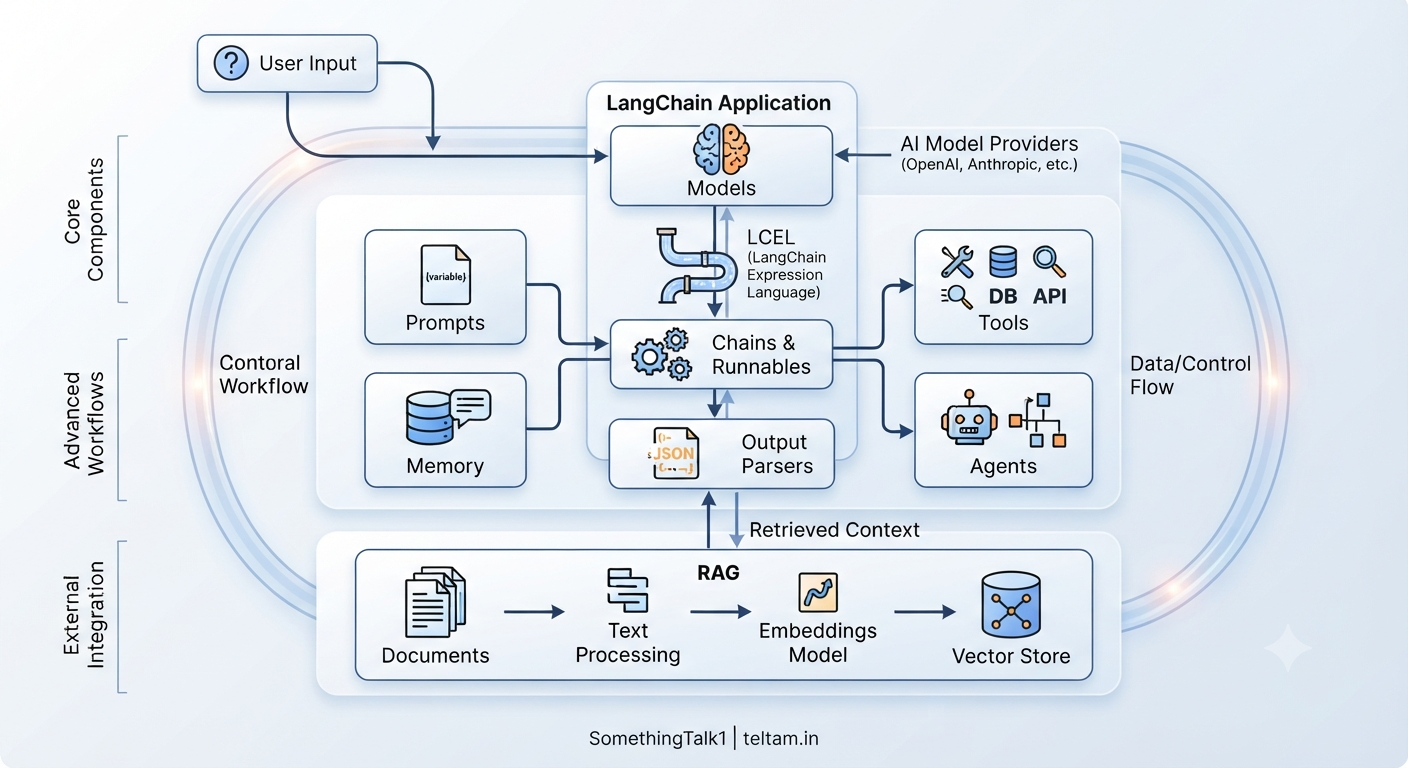
Core Components of LangChain
LangChain consists of several important components.
The major building blocks include:
-
Models
-
Prompts
-
Chains
-
Memory
-
Tools
-
Agents
-
Retrieval systems
-
Output parsers
Let's understand each one.
1. Models
Models are the AI engines used to process information and generate responses.
Examples include:
-
OpenAI models
-
Anthropic models
-
Other supported language models
LangChain does not create Large Language Models.
Instead, it provides ways to connect applications with different AI models.
You can think of the model as:
The intelligence component of the application.
User Input
     ↓
LangChain
     ↓
AI Model
     ↓
Generated Response
2. Prompts
A prompt is the instruction provided to an AI model.
For example:
"Explain Artificial Intelligence in simple terms."
Prompts play an important role in controlling how the model responds.
However, writing the same prompt structure repeatedly can become difficult to manage.
This is where prompt templates are useful.
Prompt Templates
Prompt templates allow developers to create reusable prompts.
For example:
Explain {topic} in simple terms.
The {topic} can change dynamically.
Examples:
Explain Machine Learning in simple terms.
or:
Explain LangChain in simple terms.
Prompt templates provide several benefits:
-
Reusable
-
Consistent
-
Easy to maintain
-
Dynamic
3. Chains
A Chain is a structured sequence of steps.
A simple chain may look like this:
Prompt
   ↓
Model
   ↓
Output
The flow is generally predefined.
For example:
Input
  ↓
Generate Summary
  ↓
Translate Summary
  ↓
Final Output
Chains are useful when the workflow is known in advance.
Common Use Cases for Chains
Chains can be used for:
-
Text summarization
-
Translation
-
Content generation
-
Data transformation
-
Structured AI workflows
The main advantage of a chain is:
The workflow is structured and predictable.
4. Memory
Memory allows an AI application to maintain context from previous interactions.
Without conversation context, an AI system may treat every message independently.
For example:
User: My name is Ravi.

Later...

User: What is my name?
Without relevant memory, the system may not have access to the previous information.
With memory or conversation context:
User: My name is Ravi.

Later...

User: What is my name?

AI: Your name is Ravi.
Memory is particularly useful for:
-
Chatbots
-
Conversational AI
-
Personal assistants
-
Multi-step interactions
Why Memory Matters
Memory can help an AI system maintain:
-
Conversation history
-
User context
-
Previous interactions
-
Task information
This allows the application to provide responses that are more context-aware.
5. Tools
Tools allow an AI application to interact with external systems.
Examples of tools include:
-
APIs
-
Database queries
-
Calculators
-
Search systems
-
File systems
Tools provide capabilities that go beyond simply generating text.
For example:
User Request
     ↓
AI Model
     ↓
Select Tool
     ↓
Execute Tool
     ↓
Receive Result
     ↓
Generate Response
You can think of tools as:
The external capabilities available to an AI system.
Examples of Tool Usage
Calculator
User:
"Calculate 25 × 48."
The AI system can use a calculator tool.
Database
User:
"Show me the latest customer information."
The application can query a database.
API
User:
"Get information from an external service."
The application can use an API.
Tools help connect AI systems with real-world applications.
6. Agents
Agents are designed for situations where the next step cannot always be predetermined.
An agent can:
-
Analyze a request
-
Decide what to do next
-
Select an appropriate tool
-
Perform multiple steps
-
Use the results to continue the task
You can think of an agent as:
An AI-driven decision-making system.
A simplified workflow looks like this:
User Request
     ↓
Agent
     ↓
Analyze the Task
     ↓
Decide Next Action
     ↓
Use Tool if Needed
     ↓
Observe Result
     ↓
Continue or Respond
Chain vs Agent: Key Difference
| Feature | Chain | Agent |
|---|---|---|
| Flow | Fixed | Dynamic |
| Control | Predefined by developer | Decides next steps dynamically |
| Tools | Based on predefined workflow | Can select from available tools |
| Complexity | Simple to moderate | More advanced workflows |
| Best For | Predictable tasks | Multi-step tasks |
The simple rule is:
Use Chains when the workflow is predictable.
Use Agents when the system needs to decide what to do next.
What Is RAG?
RAG stands for:
Retrieval-Augmented Generation
RAG allows an AI system to retrieve relevant information before generating a response.
This is especially useful when you want an AI application to answer questions using your own documents or data.
For example:
User Question
     ↓
Search Documents
     ↓
Retrieve Relevant Information
     ↓
Send Information to LLM
     ↓
Generate Answer
How RAG Works
A typical RAG workflow includes the following steps:
Step 1: Prepare Documents
Collect the documents or information that the AI system should use.
Step 2: Convert Text into Embeddings
Text is converted into numerical representations called embeddings.
Step 3: Store the Embeddings
The embeddings are stored in a vector store.
Step 4: Retrieve Relevant Information
When a user asks a question, the system searches for relevant information.
Step 5: Send Context to the LLM
The retrieved information is provided as context to the model.
Step 6: Generate the Response
The LLM uses the retrieved context to generate a response.
RAG Architecture
Documents
    ↓
Text Processing
    ↓
Embeddings
    ↓
Vector Store
    ↓
User Question
    ↓
Retrieve Relevant Information
    ↓
LLM
    ↓
Answer
RAG is commonly used for:
-
Document Q&A
-
Knowledge assistants
-
Company knowledge systems
-
Research applications
Embeddings Explained
Embeddings are numerical representations of information.
They allow systems to represent the meaning or relationships between pieces of text in a mathematical form.
For example:
Text
 ↓
Embedding Model
 ↓
Numbers
These numerical representations can be used to compare information based on similarity.
Vector Stores
A vector store is used to store and search embeddings.
The general process is:
Documents
    ↓
Embeddings
    ↓
Vector Store
    ↓
Similarity Search
    ↓
Relevant Results
Vector stores are useful for semantic search.
What Is Semantic Search?
Traditional search often focuses heavily on keywords.
Semantic search focuses more on finding information that is relevant in meaning.
For example, a user may ask:
"How do I learn AI?"
A semantic search system may identify information related to:
-
Artificial Intelligence courses
-
AI learning paths
-
Machine Learning fundamentals
Even when the exact words are different.
This is one of the important capabilities used in RAG systems.
Multi-Turn Conversations
Many AI applications need to support conversations instead of isolated questions.
For example:
User: I want to learn Python.

AI: Great. Python is a good programming language for beginners.

User: How long will it take?

AI: ...
The second question depends on the previous conversation.
Multi-turn applications can use:
-
Chat models
-
Conversation context
-
Memory
-
Chains
-
Agents
This helps create more natural conversational experiences.
Sequential Chains and Multi-Step AI Workflows
Some tasks require multiple predefined steps.
For example:
Generate Blog Topic
        ↓
Create Outline
        ↓
Write Article
        ↓
Generate Summary
Each step can use the output from the previous step.
This approach is useful for:
-
Content generation
-
Automation workflows
-
Data processing
-
Multi-step AI applications
Output Parsers
AI models often generate responses as plain text.
However, real-world applications may need structured output.
For example:
{
  "title": "Introduction to AI",
  "level": "Beginner"
}
Output parsers help process AI responses into formats such as:
-
JSON
-
Lists
-
Structured objects
-
Application-friendly data
This is useful when AI output needs to be used by another part of an application.
Why Output Parsing Is Important
Imagine an application expects:
Name
Email
Phone Number
If the AI returns a long paragraph, the application may have difficulty processing the result.
Structured output makes it easier for software systems to use AI-generated information.
Callbacks and Monitoring
When building AI applications, developers often need to understand what happens during execution.
Monitoring can help track:
-
Prompt processing
-
Model responses
-
Tool usage
-
Workflow execution
-
Performance
Callbacks can be used to observe and monitor different stages of an AI workflow.
They can help developers:
-
Debug applications
-
Track execution
-
Monitor performance
-
Stream responses
Switching Between AI Models
AI applications may need flexibility in choosing models.
Different models may have different:
-
Capabilities
-
Costs
-
Performance characteristics
-
Context limits
LangChain provides abstractions that can help developers work with different model providers.
For example, an application may work with models from different providers depending on the application's requirements.
This can make AI application development more flexible.
LCEL: LangChain Expression Language
LCEL stands for:
LangChain Expression Language
It provides a way to create pipelines by connecting components together.
A simplified example looks like:
Prompt | Model | Output Parser
The output of one component can become the input to the next component.
For example:
User Input
     ↓
Prompt Template
     ↓
LLM
     ↓
Output Parser
     ↓
Structured Result
This approach can make workflows:
-
Clean
-
Modular
-
Readable
Runnables
In modern LangChain workflows, components can be composed into reusable pipelines.
Examples of components include:
-
Prompts
-
Models
-
Parsers
This approach makes it easier to create flexible workflows where different components can be connected together.
For example:
Prompt
   |
Model
   |
Parser
Each component performs a specific role in the overall workflow.
Putting Everything Together
A complete AI application may combine several LangChain concepts.
User Input
     ↓
Prompt Template
     ↓
Memory / Context
     ↓
LLM
     ↓
Need External Information?
     ↓
Use Retrieval or Tools
     ↓
Process Results
     ↓
Generate Final Response
Depending on the application, the workflow may also include:
-
RAG
-
Agents
-
Output parsing
-
Monitoring
Example: Document Question-Answering System
Let's look at a simple example.
A company has many documents and wants employees to ask questions about them.
The workflow could look like this:
Company Documents
        ↓
Split Documents
        ↓
Create Embeddings
        ↓
Store in Vector Database
        ↓
Employee Question
        ↓
Retrieve Relevant Documents
        ↓
Send Context to LLM
        ↓
Generate Answer
This is a common example of a RAG-based application.
Example: AI Agent Application
Now consider a different use case.
A user asks:
"Find information, analyze it, and provide a summary."
The workflow may look like:
User Request
     ↓
AI Agent
     ↓
Analyze Request
     ↓
Select Tool
     ↓
Retrieve Information
     ↓
Analyze Results
     ↓
Generate Summary
Unlike a fixed chain, the agent can determine the next action based on the task and available information.
LangChain for Beginners: What Should You Learn First?
If you are starting with LangChain, you can follow this learning path.
Step 1: Understand LLM Basics
Learn:
-
What is an LLM?
-
How prompts work
-
How AI models generate responses
Step 2: Learn Prompt Templates
Understand how to create reusable prompts.
Learn how to pass dynamic variables into prompts.
Step 3: Learn Models
Connect your application to an LLM.
Understand:
-
Input
-
Output
-
Model responses
Step 4: Learn Chains and Runnables
Build simple AI workflows.
For example:
Prompt → Model → Output
Step 5: Learn Output Parsing
Understand how to convert AI responses into structured formats.
Step 6: Learn RAG
Explore:
-
Documents
-
Text splitting
-
Embeddings
-
Vector stores
-
Retrieval
Step 7: Learn Tools
Allow AI applications to interact with:
-
APIs
-
Databases
-
External functions
Step 8: Learn Agents
Once you understand the basics, explore AI agents and dynamic workflows.
A Simple LangChain Learning Roadmap
LLM Basics
    ↓
Prompts
    ↓
Prompt Templates
    ↓
Models
    ↓
Chains and Runnables
    ↓
Output Parsers
    ↓
Embeddings
    ↓
Vector Stores
    ↓
RAG
    ↓
Tools
    ↓
Agents
Following this path can help you gradually move from basic AI applications to more advanced systems.
Final Thoughts
LangChain provides a collection of tools and components for building applications powered by Large Language Models.
It helps developers move beyond simple:
Prompt → Response
interactions.
Using concepts such as:
-
Prompts
-
Models
-
Chains
-
Memory
-
Retrieval
-
Tools
-
Agents
-
Output parsing
developers can build more advanced AI workflows.
One-Line Summary
LangChain is a framework that helps connect Large Language Models with data, tools, workflows, and real-world applications.
What Should You Build Next?
If you are learning LangChain, start by building simple projects.
Beginner Projects
-
Simple AI chatbot
-
Text summarizer
-
Translation application
Intermediate Projects
-
Document Q&A system
-
RAG application
-
AI assistant with memory
Advanced Projects
-
AI agents
-
Multi-tool AI systems
-
Multi-step AI workflows
The best way to learn LangChain is:
Learn the concepts and build projects step by step.
Conclusion
LangChain helps developers build AI applications that go beyond simple conversations with an LLM.
It provides building blocks for connecting AI models with:
-
Prompts
-
Data
-
Memory
-
Tools
-
Retrieval systems
-
Multi-step workflows
Whether you want to build a chatbot, a RAG application, or an AI agent, understanding these components provides a strong foundation for AI application development.
Start simple.
Build a basic application.
Then gradually explore:
RAG → Tools → Agents → Advanced AI Workflows
Final Takeaway
Remember:
LLM
 ↓
Intelligence

Prompts
 ↓
Instructions

Chains
 ↓
Structured Workflows

Memory
 ↓
Context

Tools
 ↓
External Capabilities

RAG
 ↓
External Knowledge

Agents
 ↓
Dynamic Decision-Making
Together, these concepts form an important foundation for building modern AI applications.
Closing
Want to learn more about:
-
Artificial Intelligence
-
Large Language Models
-
LangChain
-
RAG
-
AI Agents
-
Agentic AI
-
Prompt Engineering
Follow for more educational content.
YouTube: SomethingTalk1
Website: teltam.in
Comments (0)
No comments yet. Be the first to share your thoughts!
Join the Conversation
Please log in to your Teltam account to post a comment on this article.
Log In to Comment