If AI Can Write Code, Why Should You Still Learn Coding in 2026?
Introduction
Artificial Intelligence is rapidly changing the way we build software.
Today, AI tools can:
-
Generate code
-
Fix bugs
-
Explain programming concepts
-
Create websites and applications
-
Help developers work faster
Naturally, this raises an important question:
"If AI can write code, why should we still learn coding?"
This is a valid question.
The answer is simple:
AI is changing how we code, but understanding coding is still essential.
The role of a developer is evolving.
Instead of spending all their time writing every line of code manually, developers can now focus more on:
-
Understanding problems
-
Designing systems
-
Giving clear instructions
-
Reviewing AI-generated code
-
Testing and improving applications
In short:
Less typing. More thinking.
AI Is Changing Coding, Not Replacing It
AI is not simply here to eliminate developers.
Instead, it is transforming the way developers work.
Earlier, Coding Often Meant:
-
Writing every line manually
-
Debugging everything yourself
-
Spending hours writing repetitive code
-
Searching through documentation for syntax
Today, Development Can Look Like:
-
Understanding the problem
-
Planning the solution
-
Giving AI clear instructions
-
Reviewing generated code
-
Testing the application
-
Improving the final result
The biggest change is not that programming has disappeared.
The change is that developers now have powerful AI assistants.
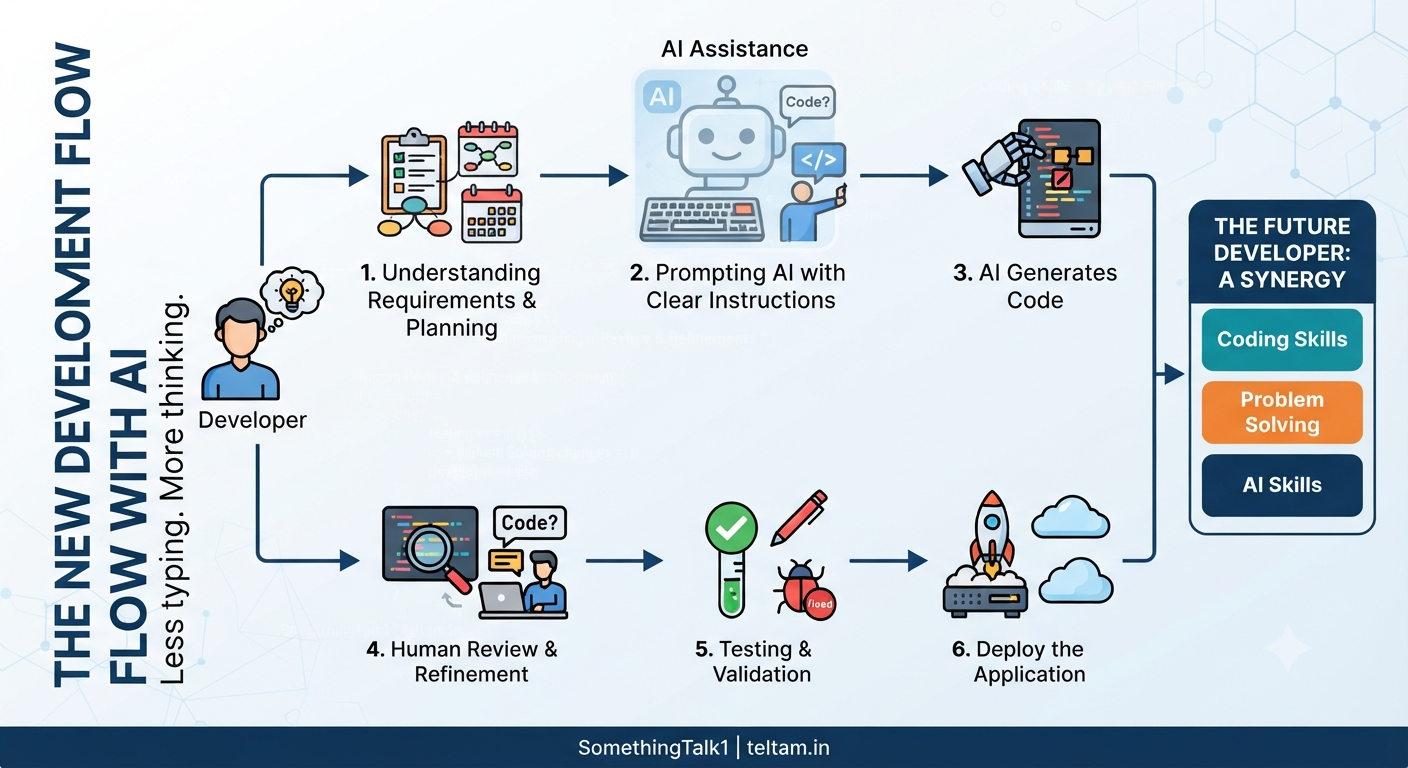
The New Development Flow with AI
Modern software development can follow a workflow like this:
Problem or Idea
       ↓
Understanding Requirements
       ↓
Planning the Solution
       ↓
Prompting AI with Clear Instructions
       ↓
AI Generates Code
       ↓
Human Reviews and Improves
       ↓
Testing and Validation
       ↓
Deploy the Application
AI can help at multiple stages.
But the developer is still responsible for understanding the problem and ensuring that the final application works correctly.
Let's understand this step by step.
Step 1: Start With the Problem, Not the Code
In the AI era, development begins with:
Clarity of thought—not programming syntax.
Before writing code or asking AI to generate code, you need to understand the problem.
Ask yourself:
-
What problem am I trying to solve?
-
Who will use this application?
-
What should the system do?
-
What should happen when something goes wrong?
For example, imagine you want to build an online shopping application.
Simply telling AI:
"Build an e-commerce website."
may not be enough.
You need to think about:
-
User registration
-
Product management
-
Shopping carts
-
Payments
-
Order tracking
-
Security
AI can generate code.
But you still need to understand:
What should be built and why.
If your understanding is unclear, the instructions you give AI will also be unclear.
And unclear instructions usually lead to unclear results.
Step 2: Translate Your Idea Into Clear Instructions
AI depends heavily on how clearly you communicate.
A vague request can produce vague or incorrect results.
Instead of jumping directly into coding, break the problem into smaller steps.
Define:
-
Expected behavior
-
Inputs
-
Outputs
-
Rules
-
Constraints
For example, instead of saying:
"Create a login system."
You might define:
-
Users should be able to register
-
Passwords should be securely handled
-
Invalid login attempts should show an error
-
Users should remain logged in after authentication
The more clearly you understand a system, the better you can communicate with AI.
This is where coding knowledge becomes extremely useful.
Coding teaches you how software systems are structured.
Step 3: Let AI Generate Code
Once you understand the problem and provide clear instructions, AI can help generate code.
AI may assist with:
-
Backend development
-
Frontend components
-
APIs
-
Database queries
-
Business logic
-
Tests
-
Documentation
This can significantly speed up development.
However, there is one important thing to remember:
AI-generated code is a starting point—not automatically the final solution.
Generated code still needs to be:
-
Reviewed
-
Tested
-
Debugged
-
Improved
You should never assume that generated code is automatically correct.
Step 4: Review and Debug the Output
AI-generated code can contain problems.
For example:
-
Logical errors
-
Missing validation
-
Incorrect assumptions
-
Security issues
-
Inefficient code
-
Poor system design
This is why developers need to understand the code that AI generates.
You should be able to:
-
Read the code
-
Understand what it does
-
Identify potential problems
-
Debug errors
-
Improve the implementation
Imagine AI generates 500 lines of code.
If something breaks and you do not understand programming, you may not know:
-
Where the problem is
-
Why it happened
-
How to fix it
Coding knowledge gives you control.
You should use AI to accelerate development—not blindly depend on it.
Step 5: Connect Everything Together
Real-world applications are not just single programs or scripts.
A complete application may include:
-
Frontend applications
-
Backend services
-
Databases
-
APIs
-
Authentication systems
-
Cloud infrastructure
-
External integrations
For example:
Frontend
    ↓
Backend API
    ↓
Business Logic
    ↓
Database
    ↓
External Services
Someone needs to decide:
-
How these components connect
-
Which architecture should be used
-
How data flows through the system
-
How the application will scale
AI can suggest solutions.
But you still need to make architectural decisions.
This is called:
System Design
As applications become larger, system thinking becomes even more important.
Step 6: Test and Validate Everything
Before deploying an application, it needs to be tested.
You should check:
-
Does the application work correctly?
-
What happens when users provide invalid input?
-
What happens in unexpected situations?
-
Are there security problems?
-
Does the application handle edge cases?
AI can help generate tests.
But someone still needs to decide:
What should be tested and whether the results are acceptable.
Testing is especially important because AI-generated code may appear correct while still containing hidden problems.
Remember:
AI does not take responsibility for the final application. The developer does.
Step 7: Build and Improve Continuously
Software development does not end after deployment.
Once an application is released, developers need to:
-
Gather user feedback
-
Fix bugs
-
Improve features
-
Optimize performance
-
Add new functionality
AI can help throughout this process.
For example, AI can assist with:
-
Debugging
-
Refactoring
-
Writing documentation
-
Generating tests
-
Explaining unfamiliar code
In this workflow, AI becomes:
Your assistant—not your replacement.
Why Coding Still Matters
Even in an AI-driven world, learning coding provides important skills.
Coding helps you:
-
Think logically
-
Break complex problems into smaller steps
-
Understand how software works
-
Debug real-world issues
-
Design scalable systems
-
Build reliable applications
The goal of learning programming is not simply memorizing syntax.
The real value is learning:
How to think like a problem solver.
Coding Is More Than Writing Syntax
Many beginners think coding means:
"Writing Python, Java, or JavaScript code."
But coding involves much more.
It teaches you how to:
Understand a Problem
       ↓
Break It Into Steps
       ↓
Design a Solution
       ↓
Implement the Solution
       ↓
Test the Result
       ↓
Improve the System
AI can help with implementation.
But understanding the complete process remains extremely valuable.
A Simple Analogy
Think about AI like a calculator.
Calculators did not eliminate mathematics.
Instead, they made people:
-
Faster
-
More efficient
-
More productive
However, you still need to understand mathematics to know:
-
Which calculation to perform
-
Whether the answer makes sense
-
How to use the result
AI works similarly.
AI can generate code.
But developers still need to understand:
-
What to build
-
How the system should work
-
Whether the generated solution is correct
So:
AI will not eliminate the value of coding knowledge.
Instead:
AI can amplify the capabilities of skilled developers.
So, Should You Still Learn Coding?
Yes—More Than Ever.
But the way you learn coding should evolve.
Do not focus only on memorizing syntax.
Focus on:
1. Problem Solving
Learn how to understand and solve problems.
2. Programming Fundamentals
Understand:
-
Variables
-
Functions
-
Conditions
-
Loops
-
Data structures
-
Object-Oriented Programming
3. System Thinking
Learn how different components work together.
For example:
-
Frontend
-
Backend
-
APIs
-
Databases
-
Cloud services
4. Debugging
Learn how to find and fix problems.
5. Using AI Effectively
Learn how to:
-
Give clear instructions
-
Review AI-generated code
-
Improve generated solutions
-
Validate results
The future developer will combine:
Coding Skills + Problem Solving + AI Skills
The New Role of a Developer
The developer's role is evolving.
Earlier, developers spent much more time:
Writing code manually.
Now, developers may spend more time:
Designing, reviewing, validating, and improving systems.
The future development workflow may look like this:
Developer
    ↓
Understands the Problem
    ↓
Designs the Solution
    ↓
Uses AI as an Assistant
    ↓
Reviews the Generated Code
    ↓
Tests and Validates
    ↓
Builds a Reliable Product
AI helps developers move faster.
But the developer still provides:
-
Direction
-
Understanding
-
Judgment
-
Responsibility
AI Cannot Replace Understanding
AI can generate thousands of lines of code in seconds.
But code generation alone does not guarantee a successful application.
Someone still needs to answer:
-
What problem are we solving?
-
Who are the users?
-
What features are required?
-
Is the system secure?
-
Is the architecture scalable?
-
Does the application actually work?
These questions require understanding and judgment.
That is why coding knowledge remains important.
Final Thought
AI can write code.
But a skilled developer understands:
-
What to build
-
Why it needs to be built
-
How the system should work
-
Whether the generated solution is correct
AI can generate the implementation.
But understanding the problem remains a human responsibility.
The Future of Software Development
The future does not belong only to people who know how to write code manually.
And it does not belong to people who blindly depend on AI.
The future belongs to people who can combine:
Coding + AI + Thinking
This combination allows you to become more than someone who simply writes code.
You become a:
Real-world problem solver.
Conclusion
AI is transforming software development.
It is making developers:
-
Faster
-
More productive
-
More capable
But AI does not remove the need for programming knowledge.
Instead, it changes where developers create the most value.
The future developer will need to:
-
Understand problems
-
Design systems
-
Use AI effectively
-
Review generated code
-
Test applications
-
Take responsibility for the final product
So, if you are wondering whether you should learn coding in 2026:
The answer is yes.
Learn coding.
But do not learn only to write syntax.
Learn to:
Think, solve problems, design systems, and use AI effectively.
Final Takeaway
AI can generate code.
But understanding code gives you the ability to control, improve, and validate what AI creates.
The strongest developers of the future will combine:
Coding + AI + Problem Solving
Closing
Want to learn more about:
-
Artificial Intelligence
-
Programming
-
Generative AI
-
AI-Assisted Development
-
AI Agents
-
System Design
-
Machine Learning
Follow for more educational content.
YouTube: SomethingTalk1
Website: teltam.in
Comments (0)
No comments yet. Be the first to share your thoughts!
Join the Conversation
Please log in to your Teltam account to post a comment on this article.
Log In to Comment