- -making.
- Machine Learning (ML): A subset of AI where systems learn patterns from data.
- Generative AI: AI that can generate new content such as text, code, images, summaries, and explanations.
For many working professionals, Generative AI is one of the most immediately useful forms of AI because it can assist with existing workflows without requiring them to build complex models from scratch.
Think of Generative AI as:
An intelligent assistant that understands context and produces useful output.
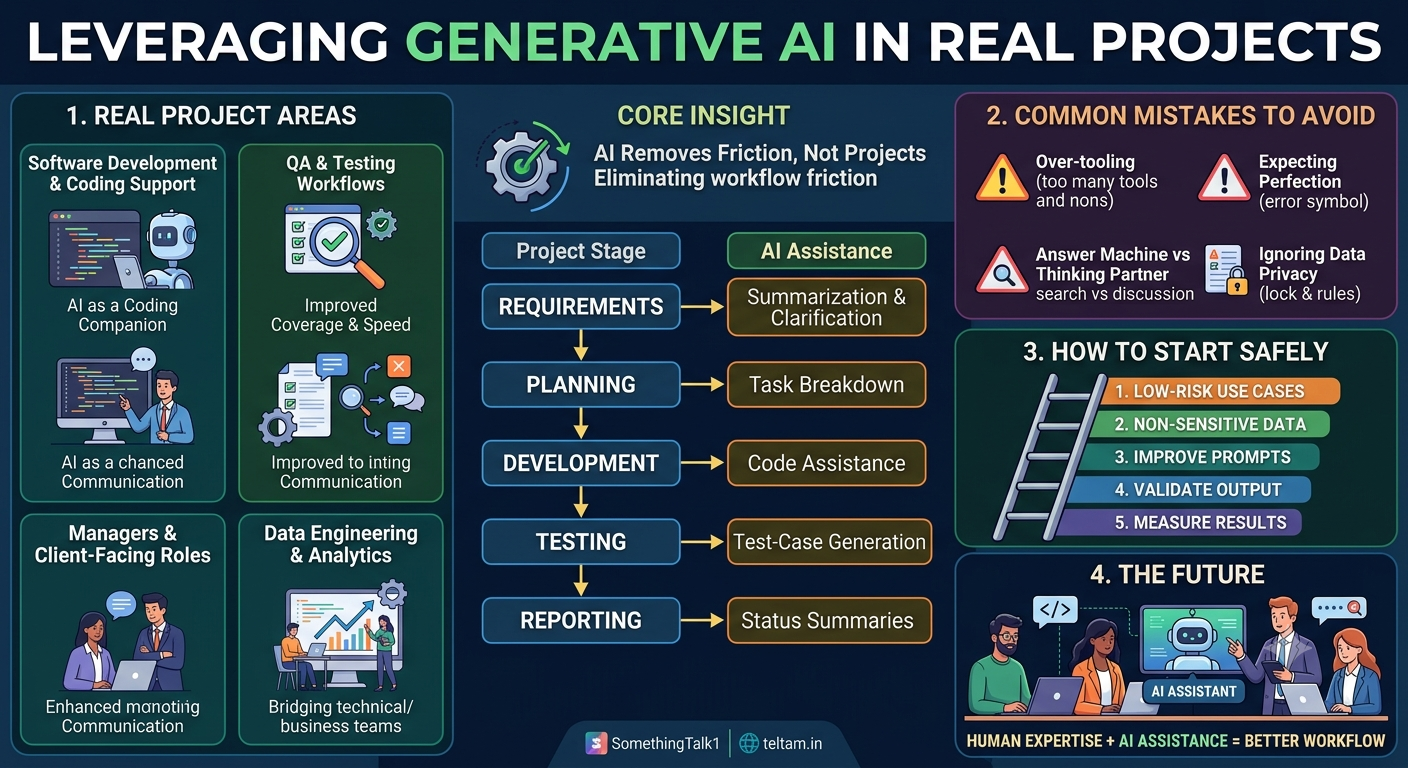
The Core Insight: AI Does Not Replace Projects – It Removes Friction
One common fear is that AI will completely take over projects.
In practical project environments, Generative AI is better understood as a capability that reduces friction in existing workflows.
It can help you:
- Think faster
- Explain concepts better
- Reduce repetitive effort
- Improve clarity
- Generate first drafts
- Explore alternative solutions
The important question is not:
“How can I add AI to my project?”
Instead, ask:
“Where does my project currently lose time or require repetitive effort?”
That is where AI can often provide the most value.
Real Project Areas Where Generative AI Fits Naturally
1. Requirement Understanding & Documentation
Every project begins with requirements. These may come through emails, documents, Jira tickets, meeting notes, or conversations.
Requirements are often:
- Unclear
- Incomplete
- Written in business language
- Spread across multiple documents
Generative AI can help transform this information into structured content.
It can assist with:
- Converting business requirements into technical tasks
- Generating user stories
- Creating acceptance criteria
- Summarizing long requirement documents
- Identifying missing information
- Creating documentation drafts
Example
Suppose a client provides a long requirement document.
Instead of manually converting everything into development tasks, you can ask:
“Convert this requirement into technical tasks for a backend developer. Group the tasks by API, database, validation, and testing.”
AI can produce an initial structured version that the team can review and refine.
The important point is that AI creates the draft; the team remains responsible for validating it.
2. Software Development & Coding Support
Generative AI has become a useful coding companion for developers.
It can assist with:
- Writing boilerplate code
- Explaining unfamiliar code
- Refactoring logic
- Generating sample APIs
- Creating documentation
- Finding potential bugs
- Generating test code
For example, instead of spending significant time searching through multiple sources to understand an unfamiliar function, a developer can ask:
“Explain this function step by step and identify any possible edge cases.”
This can reduce cognitive load and help developers understand existing systems faster.
However, generated code should still be reviewed, tested, and integrated according to the project's engineering standards.
3. Data Engineering & Analytics Projects
In data projects, a significant amount of effort goes into understanding data, writing queries, transforming datasets, and communicating results.
Generative AI can assist with:
- Generating SQL from natural-language requirements
- Explaining complex joins
- Explaining data transformations
- Suggesting analytical approaches
- Helping identify potential features
- Converting technical results into business-friendly explanations
For example:
“Find the top five products by revenue for each region and explain the SQL query.”
AI can generate a starting point and explain the logic.
This makes Generative AI useful as a bridge between technical teams and business users.
4. QA & Testing Workflows
Testing can involve repetitive work, especially when applications contain large numbers of features and scenarios.
Generative AI can help create:
- Test cases
- Edge cases
- Regression checklists
- Test data ideas
- Test scenarios from requirements
- Documentation for testing workflows
For example, given a login requirement, AI can help identify scenarios such as:
- Valid username and password
- Invalid password
- Empty fields
- Invalid email format
- Account lockout scenarios
- Password boundary conditions
The tester still decides which scenarios are relevant and validates the actual application behavior.
AI improves coverage and speed, but it does not replace testing expertise.
5. Operations, Support & Internal Tools
Support and operations teams often work with logs, incidents, tickets, and repetitive questions.
Generative AI can assist with:
- Summarizing incident reports
- Explaining error logs
- Creating internal FAQs
- Drafting support responses
- Preparing post-incident summaries
- Organizing troubleshooting information
For example, an engineer could provide an error log and ask:
“Summarize this error, identify the likely causes, and list the troubleshooting steps.”
The output can provide a starting point for investigation.
Sensitive production information should only be used according to the organization's security and data-handling policies.
6. Managers & Client-Facing Roles
AI is not only useful for developers and technical teams.
Managers and client-facing professionals spend significant time communicating information.
Generative AI can assist with:
- Status reports
- Client emails
- Meeting summaries
- Presentation outlines
- Project updates
- Action-item lists
- Documentation
For example, meeting notes can be converted into:
- Decisions made
- Pending tasks
- Owners
- Deadlines
- Risks
This can improve communication while keeping decision-making with the responsible people.
A Realistic Example: AI Inside a Project Workflow
Imagine a typical software sprint:
- Requirements come from the client
- Tasks are created
- Development begins
- Testing takes place
- Results are reported
Generative AI can assist at every stage.
| Project Stage | Possible AI Assistance |
|---|---|
| Requirements | Summarization and clarification |
| Planning | Task breakdown |
| Development | Code assistance |
| Testing | Test-case generation |
| Documentation | Draft creation |
| Reporting | Status summaries |
The project itself does not disappear.
The workflow remains the same — unnecessary friction is reduced.
Common Mistakes Teams Make With AI
Adopting AI without a clear strategy can create more problems than it solves.
1. Trying Too Many Tools
Teams sometimes experiment with multiple AI tools simultaneously without defining the actual problem.
Start with the problem, not the tool.
2. Expecting Perfect Output
AI-generated content can contain mistakes.
Generated code, analysis, summaries, and recommendations should be reviewed before use.
3. Treating AI as an Answer Machine
AI becomes more useful when treated as a thinking partner rather than simply a search box.
Ask it to:
- Explain
- Compare
- Critique
- Improve
- Generate alternatives
- Identify risks
4. Ignoring Data Privacy
Not every piece of project information should be entered into an AI system.
Organizations need appropriate policies for:
- Customer information
- Credentials
- Confidential documents
- Source code
- Internal business information
- Personal data
AI adoption must happen within the organization's security and privacy requirements.
How to Start Using Generative AI Safely at Work
A practical approach is to start small.
Step 1: Choose a Low-Risk Use Case
Start with activities such as:
- Drafting documentation
- Summarizing non-sensitive information
- Creating brainstorming ideas
- Explaining code
- Creating learning material
Step 2: Use Non-Sensitive Data
Avoid exposing confidential or restricted information unless the organization's approved AI environment explicitly permits it.
Step 3: Improve Your Prompts
Instead of:
“Write test cases.”
Try:
“Create functional and edge-case test scenarios for a user registration API. Group them by validation, authentication, error handling, and boundary conditions.”
More context generally leads to more useful output.
Step 4: Validate the Output
Never assume generated output is automatically correct.
Check:
- Facts
- Logic
- Code
- Calculations
- Security implications
- Business requirements
Step 5: Measure the Result
Ask:
Did AI actually save time or improve quality?
If the answer is no, the workflow may need to change.
Why AI Foundation Matters
Many professionals jump directly into AI tools without understanding the fundamentals.
This often creates confusion.
A strong AI foundation helps professionals understand:
- Where AI fits
- What AI can and cannot do
- How to communicate with AI effectively
- How to evaluate AI output
- Where human judgment is required
- How AI can support existing workflows
You do not need to become a machine learning researcher before using Generative AI.
But understanding the fundamentals helps you use it responsibly and effectively.
AI Is a Capability, Not a Project Requirement
Not every project needs AI.
Sometimes a simple SQL query, automation script, dashboard, or traditional software solution is better than introducing an AI system.
A useful engineering question is:
“Does AI solve this problem better than the simplest existing solution?”
If the answer is no, adding AI may only increase complexity.
Good AI adoption is therefore not about adding AI everywhere.
It is about using AI where it creates measurable value.
The Future of AI in Real Projects
Generative AI is increasingly becoming part of everyday workflows.
The biggest opportunity may not be completely new AI applications.
It may be the integration of AI into the systems and processes professionals already use.
Developers may use AI while coding.
Analysts may use AI while exploring data.
Testers may use AI while designing scenarios.
Managers may use AI while preparing reports.
Support teams may use AI while investigating incidents.
The common pattern is simple:
Human expertise + AI assistance = better workflow
Closing Thoughts
Generative AI is not magic.
It is a practical capability that can improve productivity, communication, analysis, and problem-solving when applied correctly.
You do not need to become a data scientist to benefit from AI.
You need to understand where AI fits into your work.
Start with a real problem.
Choose one practical use case.
Experiment safely.
Validate the results.
Then expand gradually.
The future of AI adoption will not belong only to people who know the most AI tools.
It will belong to professionals who understand how to connect AI capabilities with real-world problems.
Understand the problem. Use AI where it helps. Keep human judgment in the loop.
Comments (0)
No comments yet. Be the first to share your thoughts!
Join the Conversation
Please log in to your Teltam account to post a comment on this article.
Log In to Comment