Moving from single-notebook experiments to production-grade data pipelines on Azure Databricks requires a shift in how we manage governance, security, and execution performance.
When moving away from hardcoded storage keys toward Unity Catalog (UC), governance is no longer just a configuration step—it becomes an integral part of your runtime pipeline. In this guide, we break down the internal mechanics of Unity Catalog permissions, serverless compute behavior, and automated workflow orchestration.
1. The Unity Catalog Governance Hierarchy
Unity Catalog does not exist inside a single file or notebook cell. It operates as a centralized, workspace-attached service enforcing security across a 3-tier namespace (catalog.schema.table).
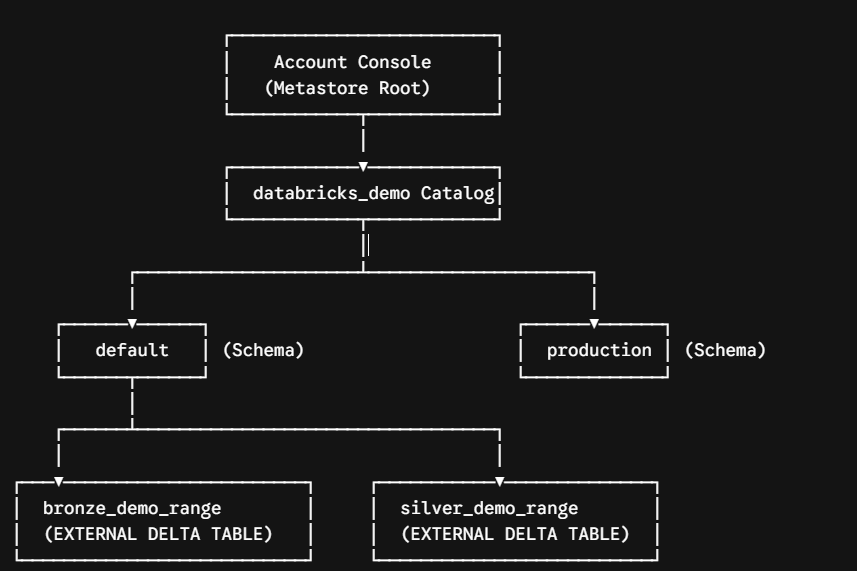
Layer-by-Layer Breakdown:
-
Metastore: Top-level container configured once by an Azure Databricks Account Administrator and attached to your workspace.
-
Access Connector (Azure Managed Identity): An Azure-native identity (
databricks-access-connector-demo) granted Storage Blob Data Contributor access on ADLS Gen2 in the Azure Portal. -
Storage Credential: Databricks abstraction (
adls_prabakarandatalake001_cred) pointing to the Access Connector ID. -
External Locations: Path mappings (
adls_prabakarandatalake001_bronzeandadls_prabakarandatalake001_silver) pointing toabfss://<container>@<storage_account>.dfs.core.windows.net/. -
Catalogs & Schemas: Logical grouping units (e.g.,
databricks_demo.default). -
Delta Tables: Physical metadata registrations referencing data paths stored inside your ADLS containers.
2. Execution Walkthrough: Under the Hood of a Delta Write
Consider running the following write operation:
delta_path = "abfss://bronze@prabakarandatalake001.dfs.core.windows.net/delta/demo_range"
df.write.format("delta").mode("overwrite").save(delta_path)
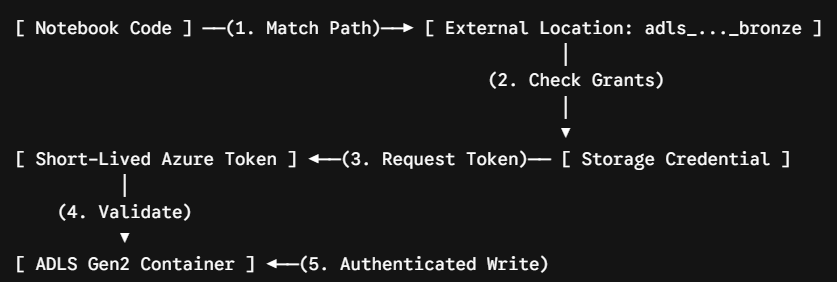
When this line executes, Unity Catalog intercepts the operation and resolves authentication through four automated steps:
-
Path Resolution: Unity Catalog identifies the registered external location that covers
abfss://bronze@.... -
Authorization Check: UC verifies that your user identity holds active
WRITE FILESpermissions on that specific external location. -
Token Exchange: UC leverages the backend Access Connector identity to request short-lived Azure storage tokens.
-
Cloud Storage Write: Azure accepts the scoped token based on the IAM role assignment, completing the write without requiring hardcoded storage account keys or SAS tokens.
Why this matters for Serverless Compute: Serverless compute engines in Azure Databricks explicitly disallow hardcoded account keys or session configurations. Unity Catalog managed identities are mandatory to run serverless workloads.
3. End-to-End Implementation Script
Below is the complete PySpark and SQL workflow for setting up credentials, writing Medallion layers, and configuring object-level security grants:
%python
from databricks.sdk import WorkspaceClient
from databricks.sdk.service.catalog import AzureManagedIdentityRequest
# 1. Resource Configuration
access_connector_id = "/subscriptions/<sub-id>/resourceGroups/<rg>/providers/Microsoft.Databricks/accessConnectors/<name>"
storage_account_name = "prabakarandatalake001"
credential_name = "adls_prabakarandatalake001_cred"
container_name = "bronze"
external_location_name = f"adls_{storage_account_name}_{container_name}"
location_url = f"abfss://{container_name}@{storage_account_name}.dfs.core.windows.net/"
w = WorkspaceClient()
# 2. Provision Storage Credential via Databricks SDK
existing = [c.name for c in w.storage_credentials.list()]
if credential_name not in existing:
w.storage_credentials.create(
name=credential_name,
azure_managed_identity=AzureManagedIdentityRequest(access_connector_id=access_connector_id),
comment=f"Managed identity access to {storage_account_name}"
)
# 3. Register Bronze External Location and Grant File Privileges
spark.sql(f"""
CREATE EXTERNAL LOCATION IF NOT EXISTS `{external_location_name}`
URL '{location_url}'
WITH (STORAGE CREDENTIAL `{credential_name}`)
""")
me = spark.sql("SELECT current_user()").first()[0]
spark.sql(f"GRANT READ FILES, WRITE FILES ON EXTERNAL LOCATION `{external_location_name}` TO `{me}`")
# 4. Ingest and Write to Bronze Path
df = spark.range(1000)
delta_path_bronze = f"{location_url}delta/demo_range"
df.write.format("delta").mode("overwrite").save(delta_path_bronze)
# 5. Register Silver External Location & Write Processed Data
spark.sql(f"""
CREATE EXTERNAL LOCATION IF NOT EXISTS `adls_{storage_account_name}_silver`
URL 'abfss://silver@{storage_account_name}.dfs.core.windows.net/'
WITH (STORAGE CREDENTIAL `{credential_name}`)
""")
delta_path_silver = f"abfss://silver@{storage_account_name}.dfs.core.windows.net/delta/demo_range"
df.write.format("delta").mode("overwrite").save(delta_path_silver)
-- 6. Catalog Table Registrations
CREATE TABLE IF NOT EXISTS databricks_demo.default.bronze_demo_range
LOCATION 'abfss://bronze@prabakarandatalake001.dfs.core.windows.net/delta/demo_range';
CREATE TABLE IF NOT EXISTS databricks_demo.default.silver_demo_range
LOCATION 'abfss://silver@prabakarandatalake001.dfs.core.windows.net/delta/demo_range';
-- 7. RBAC Access Control & Auditing
GRANT USE CATALOG ON CATALOG databricks_demo TO `account users`;
GRANT USE SCHEMA ON SCHEMA databricks_demo.default TO `account users`;
GRANT SELECT ON TABLE databricks_demo.default.bronze_demo_range TO `account users`;
-- Audit Active Privileges
SHOW GRANTS `account users` ON TABLE databricks_demo.default.bronze_demo_range;
4. Path-Based vs. Table-Based Access
Databricks Unity Catalog provides two ways to access data assets:
| Access Mechanism | Syntax Example | Security & Metadata Capabilities |
| Direct Path Access | spark.read.load("abfss://bronze@...") |
Validates READ FILES on the specific External Location. |
| Catalog Table Access | SELECT * FROM databricks_demo.default.bronze_demo_range |
Checks table-level SELECT grants, enables Column/Row Lineage, tracks Audit Logs, and surfaces assets in Catalog Explorer. |
5. Performance Monitoring: Spark UI vs. Serverless Query Profiles
When running workloads, performance debugging differs based on compute type:
-
Classic (All-Purpose) Compute: Exposes the traditional Spark UI tab under the Compute details page for tracking jobs, stages, and execution DAGs.
-
Serverless Compute: Hides traditional Spark UI settings in favor of Query Profiles. Navigate to Query History in the left sidebar, select your query, and click See Query Profile to view visual operator trees, scan metrics, and execution time breakdowns.
Summary Checklist for Engineers
-
Attach your workspace to a Unity Catalog metastore.
-
Bind ADLS Gen2 using Azure Access Connectors (Managed Identity).
-
Secure raw paths using External Locations before creating Delta tables.
-
Enforce principle of least privilege using
GRANT SELECTon specific tables. -
Automate single or multi-step execution using Databricks Workflows (Jobs).
Comments (0)
No comments yet. Be the first to share your thoughts!
Join the Conversation
Please log in to your Teltam account to post a comment on this article.
Log In to Comment